
What You Are Learning
By the end of this lesson, you will understand what a drop is, what it does, and how to recognize one in the field. You will know the difference between an aerial drop and a buried drop, where a drop starts and where it ends, and what the small box on the side of a house is doing there. You will not be qualified to install a drop, climb a pole, attach hardware, or dig a buried route. That takes training, authorization, permission from the property owner, and coordination with the service provider. Recognition is your job; installation is the crew’s job.
Start With the Basics
Think of a street where fiber has just been built. The main cable runs past every house on poles or underground. That main cable does not, by itself, give any single house service. Something still has to connect each house to that shared cable.
That something is the drop.
Here is the basic idea before we add terminology. A drop is the final, individual connection for one customer. It leaves the shared network at a nearby connection point, travels to one home or building, and ends at a small enclosure on or in that building. If the main cable is like the street, the drop is like the driveway. The street serves everyone. The driveway serves one address.
Drops are also called service drops or drop cables. In fiber to the home work, they are often called FTTH drops. FTTH means fiber to the home, which is a network design where fiber runs all the way to the customer’s premises instead of stopping partway and switching to copper wire.
What Is It?
A drop is a low fiber count cable, together with its route and its end points, that connects a distribution point in the shared network to a single customer’s premises.
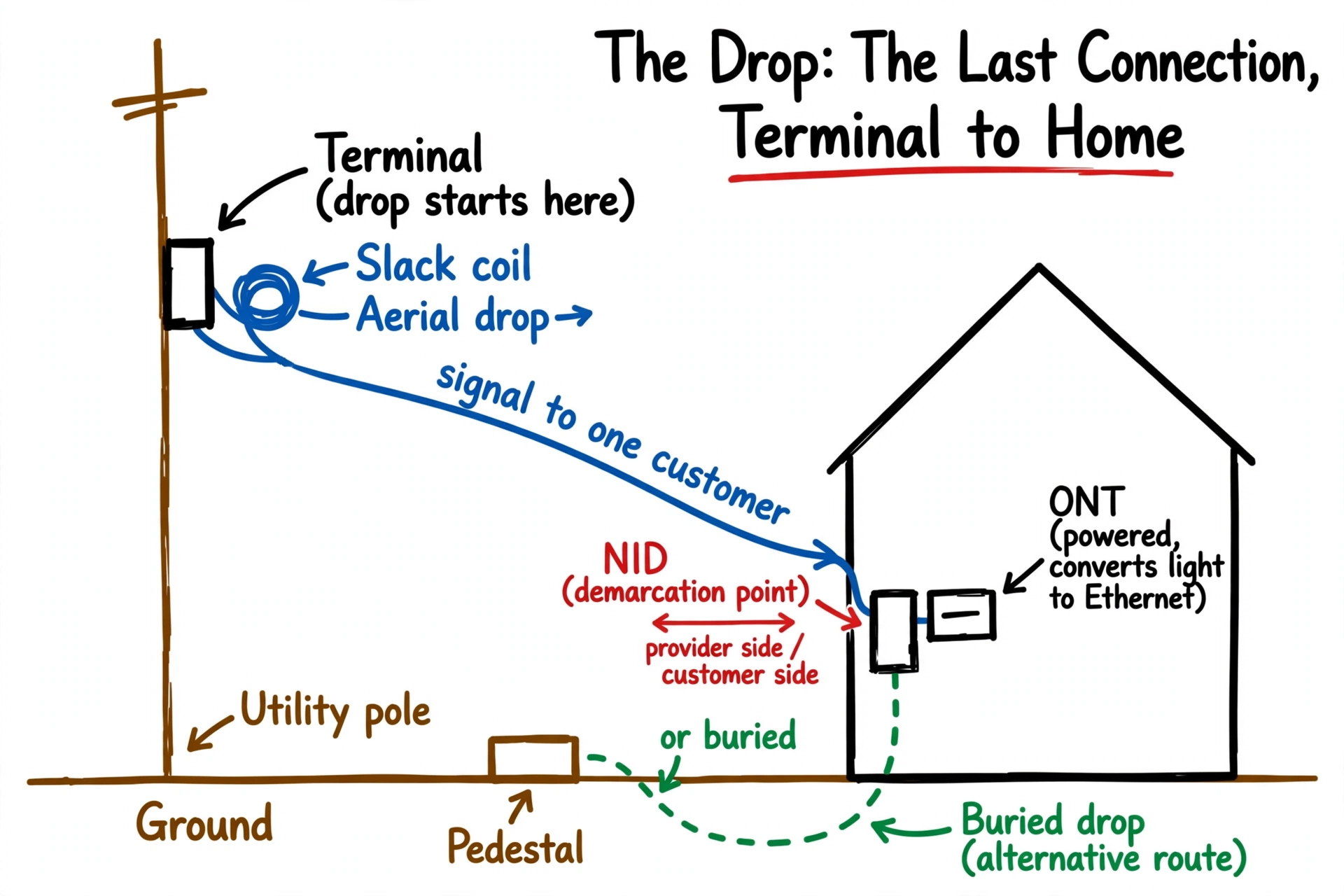
The starting point is usually a terminal. A terminal is an enclosure, on a pole, in a pedestal, or in a handhole, where individual drop connections are made to the distribution cable. Industry writing on FTTH architecture describes drop cables leaving a splitter terminal or distribution point and running to the network interface device at the customer’s home.
The ending point is at the building. In many designs the drop terminates in a network interface device, often shortened to NID. A NID is a small, weather-sealed enclosure, usually mounted on an exterior wall, that marks the demarcation point. The demarcation point is the boundary between the service provider’s network and the customer’s premises wiring. Everything on the network side of that boundary is the provider’s responsibility, and everything on the customer side belongs to the customer side of the installation. Some designs combine the NID function with the optical network terminal in one outdoor enclosure, and some providers use different names for the same boundary box, so read the label on the project rather than assuming one name fits every network.
Beyond the NID, or in place of a separate indoor run, the fiber connects to an optical network terminal, often shortened to ONT. An ONT is a powered electronic device that converts the light signal in the fiber into electrical signals that a router and other customer devices can use, such as Ethernet for internet and, where offered, connections for voice service. The ONT is active equipment. It needs electrical power. The simple exterior NID described here, by contrast, is passive in its basic form. That basic enclosure has no power and no electronics of its own, and its job is protection, termination, and test access at the boundary. Powered variants exist, including combined units that add ONT functions, so check the label and the project design.
The drop cable itself is built for this short, exposed job. Manufacturer and industry sources describe drop cable as a rugged, low fiber count cable that can be installed aerially on poles or strand, in conduit, or buried below grade, depending on the product rating and the project design. Common forms include flat drop cable and round drop cable, and many drops today are preconnectorized, meaning the connector was installed in the factory before the cable arrived in the field. Other drops are spliced or connectorized in the field by qualified installers. Which method a project uses is a design and specification choice, not a universal rule.
Full drop construction detail, including attachment methods, burial methods, and building entry work, belongs to Level 22. This lesson is the concept lesson: what a drop is, where it fits, and how to recognize it.
What Does It Look Like?
A drop looks different depending on whether it is aerial or buried, because the middle part of the route is visible in one case and hidden in the other.
An aerial drop is a single thin cable running from a pole or terminal, through the air, to the side of a building. You will usually see it start at a terminal on the pole, cross the yard or street in a gentle curve, and attach to the building wall, often near where the electric service drop and other utility services also enter. At the pole and at the building you may see attachment hardware: clamps, hooks, or brackets that hold the cable and carry its tension so the fiber itself is not crushed or pulled tight. Near one end or the other you may also see slack storage: a neat coil or loop of extra cable held on a bracket or reel. Product lines exist specifically for drop slack storage, which tells you slack management is a normal, planned part of a drop, not an accident.
A buried drop is mostly invisible once it is finished. What you see are the end points. At the street end, the route starts at a pedestal, a handhole (Lesson 5), or a terminal. At the building end, the cable comes out of the ground, often protected where it rises up the wall, and enters the enclosure on the wall. Between those points there may be temporary signs right after construction, such as a shallow trench line, disturbed soil, or marker flags from utility locates, but a finished buried drop can leave almost no surface trace. That invisibility is normal, and it is also why buried drops are easy to cut later by someone who does not know they are there.
At the building, both types look similar. Look for a small gray or light colored enclosure mounted on an exterior wall, with a thin cable entering it. That enclosure is the NID, or in some designs the outdoor ONT enclosure. Inside the building, or in a garage or utility area, you may find the ONT: a small powered unit with indicator lights, an Ethernet port, and a power supply plugged into an outlet, often with battery backup where voice service is provided.
One caution on identification: electric service drops, telephone drops, and cable television drops also run to houses, and they can look similar from the ground. A thin black cable to a house is not automatically fiber. Read labels where you can do so from a safe position, note the enclosure, and do not touch or move any service cable to check.
What Does It Do?
A drop does one main job: it carries the signal for one customer between the shared distribution network and that customer’s premises.
Without a drop, the distribution cable passing a house does nothing for that house. The signal travels past in the main cable, but there is no individual path into the building and no termination point where customer equipment can connect. The drop creates that individual path.
At the building end, the drop also creates the handoff. The fiber terminates at the demarcation point in the NID, where a technician can test and isolate a problem to one side of the boundary or the other. From there, the signal reaches the ONT, which converts light into the electrical signals the customer’s router and devices use. When people say a home “got fiber,” the physical thing that changed at that home is usually that a drop was installed and an ONT was activated.
A drop also has to survive as an individual piece of plant. Unlike the shared cable, which serves many customers along a route, a drop serves one address, crosses one yard or one span, and is handled during service orders, repairs, and trouble calls for that one customer for the life of the service.
Where Does It Fit?
The drop is the last segment of the network, often called the last mile, although a residential drop is usually far shorter than a mile. In the sequence you have learned so far, the pathway comes first (Lesson 3), conduit carries underground cable (Lesson 4), handholes provide access points along the buried route (Lesson 5), and distribution cable brings the signal into a neighborhood and to terminals near groups of homes. The drop is the step after all of that: terminal to one premises.
That order matters for construction timing. In many builds, the shared network is constructed first and drops are installed later, when a customer orders service. In other builds, drops are placed during initial construction to every lot or building passed, before anyone orders service. Both approaches exist, and the project plan decides which one is used. This is why you can see a finished fiber network on a street, with terminals on poles or in pedestals, and still see drop crews working house by house weeks later.
The drop also fits at a responsibility boundary. Construction of the shared network is one kind of work, drop installation on private property is another, and indoor work past the ONT is another still. The demarcation point at the NID is where those responsibilities are divided, which is why its location and condition matter in records and in troubleshooting.
Why Does It Matter?
The drop matters because it is the segment the customer actually experiences. A perfectly built backbone and distribution network delivers nothing to a home until its drop is installed correctly. If the drop is damaged, badly attached, cut underground, or terminated poorly, that one customer has no service or poor service, even though the rest of the network is healthy.
Drops also matter because of scale and exposure. The FOA notes that the connection to the home represents the largest share of cabling in a telecom network, because every single customer needs one. Drops are also the most exposed segment: aerial drops face weather, trees, ladders, and other utilities on the same poles, and buried drops face digging, landscaping, and fence and irrigation work in yards. This short segment is where the network meets each customer, which is why recognizing a drop and its condition is useful field knowledge even for a beginner.
Finally, drops matter because they are on customer property. Work there requires permission and coordination in a way that work in a public easement does not. A crew cannot treat a yard, a wall, or a building entry the way it treats a pole in the right of way. Noticing damage is always appropriate. Touching, moving, or rerouting a drop on someone’s property without authorization is not.
What Does Good Look Like?
A good drop, in general good practice terms, looks like this:
- The route is direct and sensible. An aerial drop follows a clear path from the terminal to the building without hanging low over areas where it will be struck, and a buried drop follows the planned route to the building entry without unnecessary crossings of other utilities.
- Attachments look secure and purpose built. Purpose made clamps, hooks, or brackets hold the cable at the pole and at the building, and the cable is supported by its strength members or messenger, as the product is designed to be supported, instead of being tied, stapled, or hung from the fiber itself.
- Slack is stored neatly. Extra cable is coiled or looped on a bracket, reel, or storage device made for the purpose, with the loops large and even rather than kinked or pulled tight, and it is secured so it will not fall or unravel.
- The building entry is protected and sealed. Where the cable rises from the ground or enters the wall, it is protected against damage and the entry is finished so water and pests are not invited in, following the project and provider requirements for that building.
- The enclosure at the building is intact, closed, and mounted securely, with the cable entering it cleanly and labels or records in place where the provider requires them.
- The ONT, where visible, is powered, mounted or placed as designed, and connected to the router, with its power supply and any battery backup in place.
Important distinction: these are general good practice characteristics. Clearances over streets and driveways, attachment heights, burial depths, separation from electric facilities, and entry requirements are not universal numbers a beginner can apply from this lesson. They come from a combination of applicable codes, utility and pole owner requirements, state and local rules, manufacturer instructions, and the contract specifications for the project. Level 22 covers drop construction in detail. In this lesson, “good” means the drop looks intentional, supported, protected, and recorded, and the project documents decide the specific requirements.
What Can Go Wrong?
Several things go wrong with drops in the field, and they are the everyday problems of the last segment of the network.
- Cut buried drops. A buried drop is hard to see after restoration, and it crosses yards where people dig for fences, trees, sprinklers, and mailboxes. Digging without utility locates can cut it in seconds. This is why the 811 system exists: in the United States, anyone planning to dig contacts 811 or their state 811 center first so underground utilities can be marked, waits the required time under state law, and then digs with care near the marks. State rules and wait times vary, so the specific requirement is the state rule, not a single national number.
- Damaged aerial drops. Storms, falling limbs, ladders placed against the span, and vehicles or equipment striking a low drop can break or stretch the cable. A drop can also be damaged where it attaches, if hardware is missing, wrong for the cable, or installed so the cable bends sharply or carries load it was not designed to carry.
- Bad slack and sharp bends. Fiber carries light in glass, and glass does not tolerate kinks or tight bends. Slack left dangling, coiled too tightly, or pinched under hardware can damage the fiber or degrade the signal, sometimes immediately and sometimes later.
- Water and damage at the enclosure. A cracked, open, or missing cover on the NID or outdoor enclosure lets water, dirt, and insects reach the termination. A damaged termination can affect one customer’s service while the rest of the street stays up.
- No drop at all, or a drop to the wrong place. Records can be wrong. A drop may be installed to the wrong terminal port, terminated but never connected to an ONT, or placed during construction and later removed during other work on the property. The network looks complete on paper and the customer still has no service.
- Confusion with other services. Electric, telephone, and cable television drops share poles and walls with fiber drops. Mistaking one service for another is not a harmless error, especially near electric facilities. A beginner who cannot positively identify a cable should treat it as unknown and keep clear.
None of these problems require exotic causes. Drops fail from weather, digging, poor support, and poor records.
What Should Someone Notice in the Field?
A beginner’s job with drops is to notice and report, from a safe position, without touching the drop, the hardware, or the enclosure. Here are specific things to observe:
- Trace the route with your eyes. For an aerial drop, follow the cable from the terminal to the building. Does it look supported at both ends, reasonably clear of trees and other services, and free of obvious damage or excessive sagging compared with neighboring drops? For a buried drop, note the end points: the pedestal, handhole, or terminal at the street and the enclosure at the building.
- Look at the slack. Is extra cable coiled neatly on a bracket or reel, or is it dangling, unraveled, lying on the ground, or pulled tight with no slack at all? Both extremes are worth reporting: loose slack gets damaged, and no slack makes future repair harder.
- Look at the building enclosure. Is the NID or outdoor enclosure present, closed, intact, and still mounted to the wall? Is the cable entering it cleanly, or hanging loose, cut, or pulled out?
- Look for fresh digging near a buried route. New fence posts, new landscaping, or fresh trench lines crossing between the street terminal and the building, on a property where service just went out, are a pattern worth reporting exactly as you saw it, without speculating beyond the observation.
- Note missing service clues. A home with a terminal nearby but no visible drop and no enclosure may simply not have ordered service yet. Do not assume it is an error. Report patterns through the project process only when your assignment asks you to survey drops.
Safety, stated plainly:
- Aerial drops involve poles, ladders, bucket trucks, and nearby electric service drops. Electric facilities can kill. A beginner never climbs a pole or a ladder to inspect a drop, never touches an aerial cable to identify it, and never works near electric conductors. Observe from the ground, from a public or authorized position.
- Buried drops involve digging near existing utilities, including electric, gas, water, and other communications lines. A beginner never digs to find, expose, or check a buried drop. Any digging on a project follows the 811 locate process and state law, and is done by authorized crews.
- Work on customer property requires permission and coordination. Be on a property only when your assignment authorizes it, identify yourself as your project requires, and never open a customer’s enclosure, move a drop, or enter a building to check an ONT unless your role and the customer’s permission clearly cover it.
- Reading this lesson teaches you to recognize a drop and its condition. It does not qualify you to install, attach, splice, dig in, or repair one.
Practical Example
This is a hypothetical example, not a report of a real incident.
A fiber network is finished on a residential street. The shared construction is complete: distribution cable is on the poles, terminals are placed, and the pedestals and handholes are in. Over the next two weeks, drop crews work house by house as customers activate service. Most installs go quickly, because the pattern repeats: terminal on the pole, aerial drop to the wall, enclosure mounted, ONT powered inside, service tested.
One house stalls. The drop crew finds that the only clear aerial path to the building crosses a large backyard tree, and the homeowner explains that a fence contractor is scheduled to dig post holes the following week along the same side of the yard the buried alternative would cross. The project coordinator changes the plan: the aerial route is adjusted with the provider’s approval to attach at a different point on the building, clear of the tree, and the homeowner is told plainly that if a buried section is ever added later, the fence work has to wait for utility locates through 811 first.
The beginner’s lesson in this story is the sequence. The drop is the last piece, it is individual to each property, and it is where the network plan meets a real yard, a real tree, and a real homeowner. Noticing that conflict early, and reporting it instead of forcing the original route, is exactly the kind of observation that keeps a simple install simple.
Key Terms
- Drop (service drop). The final, individual connection for one customer, running from a distribution point such as a terminal to that customer’s premises. Includes the drop cable, its route, and its end points.
- Drop cable. The low fiber count, rugged cable used for the drop. Common forms include flat and round drop cable, and it may be preconnectorized in the factory or terminated in the field by qualified installers.
- Terminal. An enclosure on a pole, in a pedestal, or in a handhole where drop connections are made to the distribution cable. The usual starting point of a drop.
- Network interface device (NID). A small, weather-sealed enclosure, usually on an exterior wall, where the drop terminates at the customer’s premises. In its basic exterior form it is passive, with no power and no electronics of its own. It provides protection and test access at the demarcation point.
- Demarcation point. The boundary between the service provider’s network and the customer’s premises wiring. The NID usually marks it. Responsibility for the plant changes at this point.
- Optical network terminal (ONT). A powered electronic device that converts the light signal in the fiber into electrical signals, such as Ethernet, that customer devices and routers can use. Needs electrical power, unlike the passive NID.
- Aerial drop. A drop that runs through the air from a pole or terminal to the building, supported by attachment hardware at both ends.
- Buried drop. A drop that runs underground from the street terminal, pedestal, or handhole to the building, by a method and at a depth set by the project, provider, and local requirements.
- Slack. Extra cable left intentionally, usually coiled or looped on a bracket, reel, or storage device, so the drop can be repaired, reterminated, or adjusted later without replacing the whole drop.
- FTTH (fiber to the home). A network design where fiber runs all the way to the customer’s premises. The drop is the final segment of an FTTH network.
- 811. The United States national call before you dig number. Contacting 811 or the state 811 center starts the process of having underground utilities marked before digging. State law sets the required advance notice and procedures.
Check Your Understanding
1. A distribution cable runs past twenty houses on a street, and none of the houses has service yet. What is missing for each house, and where does that missing piece start and end? 2. What is the difference between a NID and an ONT, in terms of what each one does and whether it needs power? 3. You see two drops on the same street. One runs pole to house through the air. The other leaves almost no trace on the surface. Name each type and explain why one is easy to trace visually and the other is not. 4. A homeowner’s fiber service stops working the day after a fence crew digs post holes in the yard, on a property served by a buried drop. What is a likely explanation, what should have happened before the digging, and what should a beginner do about it? 5. A drop hangs with its slack coil dangling loose and the building enclosure hanging open with its cover missing. Name two problems you can report from observation alone, without touching anything.
Answer key
1. Each house is missing its drop, the individual connection for that customer. A drop starts at a distribution point such as a terminal on a pole, in a pedestal, or in a handhole, and ends at the customer’s premises, terminating at the NID or ONT enclosure at the building. 2. A basic exterior NID is a passive enclosure with no power and no electronics of its own. It terminates and protects the drop fiber at the demarcation point and provides test access. An ONT is a powered electronic device that converts the light signal in the fiber into electrical signals such as Ethernet that customer devices can use. If it needs a power outlet and has Ethernet ports, it is an ONT. 3. The pole to house cable is an aerial drop; its whole route is in the air and visible. The nearly invisible one is a buried drop; its route is underground, so only the end points, such as a pedestal or handhole at the street and the enclosure at the building, show on the surface. 4. A likely explanation is that the digging cut the buried drop, a common failure for buried drops in yards. Before any digging, the digging party should have contacted 811 or the state 811 center, waited the time required by state law, and dug with care near the utility marks. A beginner should report the observation through the project process, noting the fresh digging and the service loss, and should never dig to find or expose the cable. 5. Any two of: slack is not stored or secured, so it can fall, kink, or be damaged; the enclosure is open with its cover missing, so water, dirt, and insects can reach the termination; the cable or enclosure mounting may be strained or damaged as a result. Report and photograph from a safe position, and do not open, close, move, or repair anything yourself.
Lesson Takeaway
A drop is the final, individual connection that turns a network passing a building into service inside that building. It starts at a terminal in the shared network, travels by air or underground to one premises, and ends at the demarcation point, usually a passive NID on the wall, feeding a powered ONT that converts light into signals customer devices can use. Drops are the most numerous and most exposed segment of the network, and the segment where the plan meets private property, trees, fences, and weather. Your job as a beginner is to recognize the route, the hardware, the slack, and the enclosure, to notice damage and conflict early, and to report it, without climbing, digging, opening, or touching.
Sources and Technical References
- The Fiber Optic Association (FOA), “The FOA Reference For Fiber Optics: Fiber To The Home.” Explains FTTH architecture, the last mile connection to the home, sharing a splitter among homes, and that each home is connected with singlemode fiber placed underground or aerial. https://FOA.org/tech/ref/appln/FTTH.html
- The Fiber Optic Association (FOA), “The FOA Reference For Fiber Optics: Outside Plant Construction, Aerial Cable Installation.” Covers aerial cable hardware, dead ends, supports, and installation methods relevant to understanding aerial drop support at an overview level. https://www.thefoa.org/tech/ref/OSP_Construction/Aerial Cable Installation.html
- Lightwave, “FTTH Architectures Face Interconnect Issues Inside the Final Mile.” Describes drop cables exiting a splitter terminal and running to a network interface device on the side of the customer’s home, with a terminated jumper to the optical converter inside. https://www.lightwaveonline.com/fttx/ftth-b/article/16648727/ftth-architectures-face-interconnect-issues-inside-the-final-mile
- Clearfield, via Cabling Installation and Maintenance, “Clearfield’s Small Form Factor FLATdrop Cable Speeds FTTX Connections.” Documents a flat drop cable product designed to connect the fiber access point in buried or aerial deployments, usable in direct bury, conduit, aerial lashed, and aerial self supporting applications, with factory connector options. https://www.cablinginstall.com/cable/article/14211909/clearfields-small-form-factor-flatdrop-cable-speeds-fttx-connections
- Preformed Line Products (PLP), “SLACKLOOP Drop Cable Storage.” Documents a purpose made slack storage loop product for round or flat drop cable, usable in aerial, pole or wall, and vault applications, confirming that drop slack storage hardware is a standard part of drop design. https://plp.com/energy/fiber-optics/adss-cable-solutions/cable-storage/slackloop-r-drop-cable-storage
- MapItRight Fiber Glossary, “NID Definition (Network Interface Device).” Defines the NID as the physical demarcation enclosure between the operator’s outside plant network and the subscriber’s inside wiring, and describes the typical fiber drop terminating at an exterior NID style enclosure. https://mapitright.com/glossary/nid
- Wikipedia, “Network Interface Device.” Defines a NID as the demarcation point between the carrier’s local loop and the customer’s premises wiring, and notes that an optical network terminal is a type of NID used with fiber to the premises applications. https://en.wikipedia.org/wiki/Network_interface_device
- AEANET, “How Does Fiber Internet Connect to a House?” Walks through the typical sequence used in this lesson: assessment, trenching or aerial installation, NID mounted outside the home, fiber run to the NID, ONT installed inside, and activation and testing. https://www.aeanet.org/how-does-fiber-internet-connect-to-a-house/
- Empower Broadband, “Fiber FAQ.” Confirms provider practice of terminating fiber in an enclosure called a Fiber Network Interface Device mounted to the side of the home or business during construction, with the ONT brought at the in home installation. https://www.empowermec.net/faqs_category/fiber-faq/
- Texas811, “Call Before You Dig Utility Safety Questions” (FAQ). Explains that a locate ticket alerts utility companies to mark underground utilities, that the service is free, and that Texas requires contact at least two working days before digging. Used here only as an example of one state’s rule, not as a national standard. https://texas811.org/faq/
Could not verify: a single universal clearance, burial depth, attachment height, or separation requirement for drops. Verified sources consistently point to codes, pole owner and utility requirements, state and local rules, manufacturer instructions, and project specifications as the deciding documents, and those values differ by place and project, so this lesson deliberately states no universal numbers. Also could not verify one single industry wide name for the building enclosure: providers variously use NID, fiber NID, and ONT enclosure terminology, and some combine the NID and ONT functions, so the lesson teaches the functions and boundary rather than one mandatory name.
Previous lesson: Lesson 9: What Is a Terminal? | Back to Level 1 hub