
If you’re brand new to fiber construction, OSP can look like a bunch of unrelated stuff happening along the side of the road.
A drill rig is set up in a field. Orange conduit is sticking out of the ground. A few hundred feet away, there is a box buried in someone’s yard. Black cables run between utility poles. Someone is taking pictures of an open hole. Another person is marking up construction prints. A splicer is working inside a trailer.
Then you start hearing words like feeder, distribution, handhole, bore, splice closure, drop, OTDR, redline, restoration, and closeout.
You can learn what every one of those words means and still have no idea how they fit together.
That is where I think learning OSP should start.
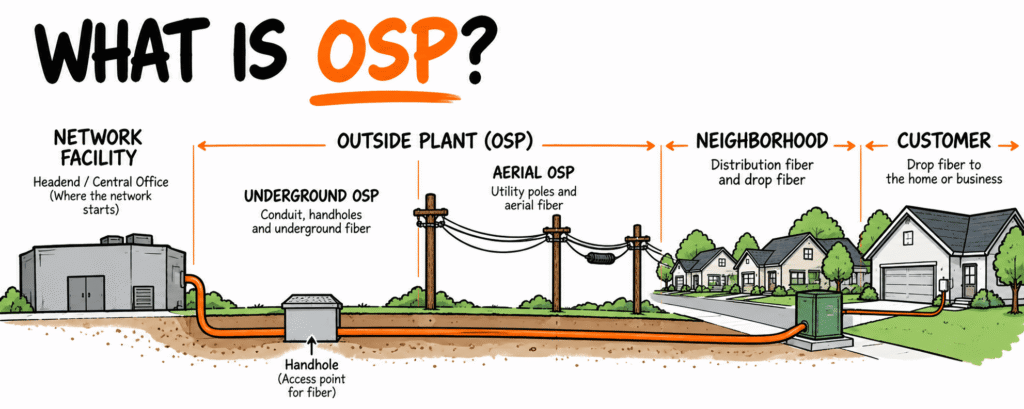
OSP stands for Outside Plant.
In telecommunications, outside plant generally refers to the physical infrastructure outside buildings and facilities that connects different parts of the network and helps carry that network across the area it serves.
When I say physical infrastructure, I mean the things that are actually built or installed in the field. Fiber-optic cable, conduit, handholes, cabinets, utility poles, splice closures, pedestals, and other equipment that creates and supports the physical network.
And when I say network, for now, think about all of those connected pieces working together to move information from one location to another. We will get much deeper into how a fiber network works later. Right now, you just need the big picture.
For someone brand new to fiber construction, I would simplify OSP even further:
OSP is how we physically get the network from where it starts to where it needs to go.
That could mean putting conduit and fiber underground. It could mean installing fiber on utility poles. It could mean placing handholes so we can access the underground pathway. It could mean splicing two sections of fiber together so the network can continue.
Those are different pieces of work, but they are all helping build the physical network.
Once you understand that idea, the equipment, construction methods, terminology, and individual jobs start making a lot more sense.
Start With What We Are Being Asked to Build
Imagine an internet service provider wants to bring fiber service to a new 300-home subdivision.
Forget about how we are going to build it for a minute.
We have a location where the existing network is available, and we have 300 homes that eventually need to connect to that network.
There is distance between them.
That distance is where the outside plant problem begins.
The fiber cannot simply jump from the existing network to the subdivision. We need a physical route connecting the two.
Now look at what might exist along that route.
There may be roads, driveways, sidewalks, utility poles, gas lines, water lines, electric facilities, sewer systems, storm drains, culverts, creeks, railroad tracks, fences, retaining walls, private property, landscaping, rock, groundwater, and dozens of other conditions.
The network has to make its way through that existing environment.
Someone has to determine where it can go.
Someone has to determine how it will get there.
Someone has to build the physical infrastructure.
Then fiber has to be installed through or on that infrastructure, connected, tested, documented, and eventually accepted.
That is OSP fiber construction.
OSP Is a System, Not One Piece of Equipment
Imagine an internet service provider wants to bring fiber service to a new 300-home subdivision.
Forget about how we are going to build it for a minute.
We have a location where the existing fiber network is available, and we have 300 homes that eventually need to connect to that network.
When I say existing network, I simply mean fiber infrastructure that has already been built and is available somewhere nearby. Our new construction needs to connect back to it.
There is distance between the existing network and those 300 homes.
That distance is where the outside plant problem begins.
The fiber cannot simply jump from the existing network to the subdivision. We need to create a physical route connecting the two.
A route is the path our new infrastructure will follow through the real world. It might follow a road, cross underneath a highway, travel through a utility right-of-way, run along utility poles, enter the subdivision, and eventually branch toward different parts of the neighborhood.
Now look at what might already exist along that route:
- Roads and driveways
- Sidewalks
- Utility poles
- Gas lines
- Water lines
- Electric facilities
- Sewer systems
- Storm drains and culverts
- Creeks
- Railroad tracks
- Fences and retaining walls
- Private property
- Landscaping
- Rock
- Groundwater
All of those things can affect where the network can go and how it can be built.
So before anyone starts installing fiber, someone has to figure out a few things.
Where does the network need to go?
We need a route from the existing network to the area we want to serve.
How can we physically get it there?
Different parts of the route may require different construction methods.
What is already in our way?
Existing utilities, roads, property, structures, terrain, and other conditions can affect the construction.
Once those questions start getting answered, the physical work can begin.
The supporting infrastructure has to be built. Fiber has to be installed through or on that infrastructure. The fiber has to be connected. The network has to be tested. What was actually built has to be documented. And eventually, the completed work has to be accepted.
That is OSP fiber construction.
Our hypothetical route to the subdivision could run underground for two miles, transition to existing utility poles for another section, then transition underground again before entering the neighborhood.
It is still one network.
The physical construction method changed.
How Do We Decide Where the Fiber Goes?
Before anyone starts drilling, trenching, plowing, or attaching fiber to poles, someone has to figure out the route.
A line on a construction drawing may look simple. The real world usually isn’t.
Suppose the shortest route to our subdivision follows one side of a road.
There is already a gas main running along that side.
A large water line crosses the proposed route.
Several driveways enter businesses along the road.
Halfway down the road is a creek.
Farther ahead, we have to cross a railroad.
Near the subdivision entrance, underground electric facilities occupy some of the space where we might want to build.
Now the question isn’t simply:
Where do we want the fiber to go?
We also have to ask:
Can we actually build it there?
That is where constructability comes in.
Constructability is simply looking at what has been designed and comparing it with the conditions that actually exist in the field.
A constructability review asks whether the proposed network can realistically be built as designed.
For example:
- Can our equipment physically fit in the available space?
- Can a directional drill be set up where it needs to be?
- Can we create the required path underground?
- What utilities are already there?
- Do we know where those utilities are and how deep they are?
- Can we maintain the required separation from them?
- Do permits, easements, or property boundaries limit where we can work?
- Can crews and equipment safely access the area?
- How are we going to get across the creek, railroad, highway, bridge, or other obstacle?
We don’t need to know how to solve every one of those problems yet.
The important thing to understand is that a route can look perfectly reasonable on a drawing and become much more complicated once someone stands in the field.
OSP construction has to connect the network we designed with the real environment where that network has to be built.
Underground or Aerial?
Once we have an idea of where the network needs to go, we also have to determine how it will physically travel along that route.
Two broad options are underground construction and aerial construction.
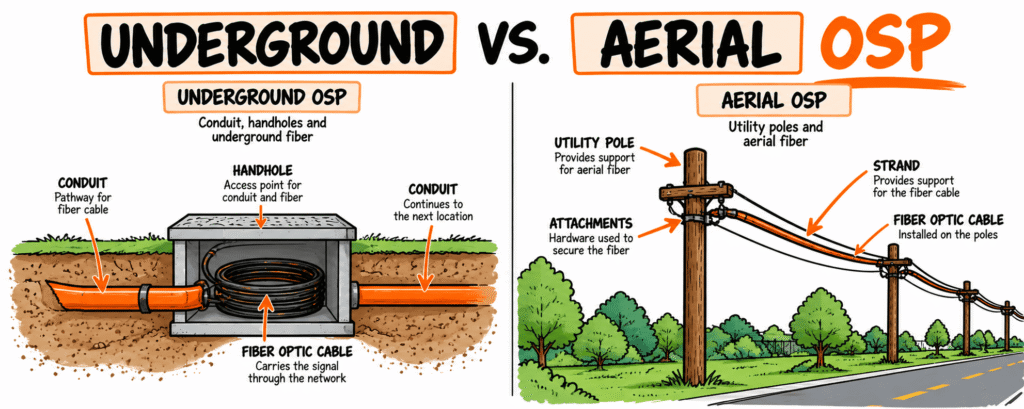
Underground OSP Fiber
Underground construction places the network infrastructure below the ground.
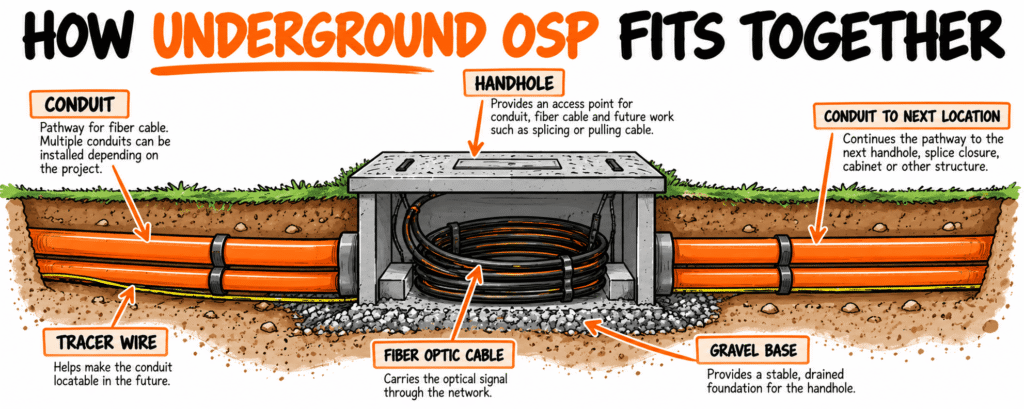
One common approach is to install conduit, which creates a protected pathway that fiber can be installed through later.
Along that conduit route, handholes or vaults can provide planned locations where crews can access the underground pathway and fiber.
There are several ways underground infrastructure can be installed.
Horizontal directional drilling (HDD) uses specialized drilling equipment to create an underground path between locations without opening the entire surface above it. You will commonly see HDD used where crews need to install conduit beneath roads, driveways, sidewalks, and other areas where digging an open trench across the entire route may not be practical.
Trenching creates an open excavation along the route. Conduit or cable is placed into the trench, and the excavation is then backfilled and restored according to the project requirements.
Plowing uses specialized equipment to install certain underground facilities as the machine moves along the route. Instead of excavating an open trench for the entire distance, the equipment creates a path through the ground as the facility is installed.
Microtrenching creates a narrow cut, commonly in a paved surface, where an approved pathway system can be installed. The cut is then restored using the required materials and process.
Some projects may also use direct-buried cable. In that type of installation, a cable designed for direct burial is installed in the ground without first being placed inside conduit.
You don’t need to know which method is best yet.
For now, understand that these are different ways of solving the same basic problem:
We need to create a safe, usable path for the network through the ground.
Which method gets used can depend on the design, project requirements, existing utilities, surface conditions, soil, rock, available space, permits, equipment, restoration requirements, and what crews actually encounter in the field.
Aerial OSP Fiber
Instead of going underground, part of our route might use existing utility poles.
That is aerial OSP construction.
At first glance, this can look easier. The poles are already there, so hang the fiber and keep going.
There is more to it than that.
Look at a typical utility pole and you may already see electric lines, telecommunications cables, transformers, equipment, guys, anchors, and other attachments.
There has to be an appropriate place for the new fiber.
Required clearances have to be maintained. The pole has to be capable of supporting the required attachments and loads. Existing facilities may need to be moved or adjusted before the new fiber can be installed.
Work performed to prepare existing poles for new attachments is commonly called make-ready work.
How the fiber itself is supported can also vary.
Some aerial fiber may be attached to a supporting messenger strand, which is a tensioned strand used to support the cable.
Other designs may use ADSS, or All-Dielectric Self-Supporting cable, which is designed to support itself between attachment points without a separate messenger strand.
You may also see guys and anchors. These help support poles against forces pulling on them from certain directions.
Fiber slack needs planned storage locations, and splice closures need locations where they can be installed and accessed when necessary.
You don’t need to memorize all of those components yet.
Right now, recognize the difference:
Underground OSP carries the network below the ground.
Aerial OSP carries the network above the ground using supporting structures such as utility poles.
Both are solving the same problem.
We need a physical way to get the network from where it is to where it needs to go.
When Does the Fiber Get Installed?
Building conduit and handholes does not mean we have installed the fiber yet.
We have built the pathway and access points that will allow the fiber cable to be installed.
The actual installation of the cable is commonly called fiber placement.
For an underground conduit system, there are different ways to place the fiber.
Fiber can be pulled through the conduit using a pull line or pull tape that runs through the pathway.
Fiber can also be blown or jetted through certain conduit systems using specialized equipment that uses airflow to help move the cable through the pathway.
Which method is used depends on the conduit system, cable, distance, equipment, project design, and other conditions.
For aerial construction, the fiber is installed along the pole route using the attachment and support system required by the design.
Regardless of how the cable is placed, fiber cable has physical limits.
For example:
- There is a limit to how much pulling force can be applied to the cable.
- There is a limit to how tightly the cable can be bent.
- The cable needs to be protected from crushing, kinking, twisting, and other types of damage.
- The manufacturer’s installation requirements need to be followed for the specific cable being installed.
You will hear the term bend radius as you learn fiber construction. Bend radius is simply the minimum radius a cable can safely be bent without exceeding its requirements. Different cables and conditions can have different requirements, so it isn’t one number that applies to every fiber cable.
The outside of a fiber cable may look rugged, but inside that cable are small strands of glass that will eventually carry information using light.
That is why cable handling matters.
A cable can be physically installed from one end of the route to the other and still have problems if it was damaged during placement.
This brings us back to an important idea in OSP:
The work being performed now has to support what happens next.
The pathway has to be usable so the cable can be placed.
The cable has to be placed without unacceptable damage so it can be spliced and perform properly.
The splices have to support the required network performance.
Testing has to help verify that performance.
Documentation has to preserve the information needed to operate and maintain the network later.
Each stage affects the next one.
Feeder, Distribution and Drop: How the Network Gets Smaller
Let’s go back to our 300-home subdivision.
We have now created a route and brought fiber into the area.
But getting fiber to the subdivision and getting fiber to 300 individual homes are two different problems.
The network needs a way to move through the service area and eventually reach individual customers.
This is where basic fiber network architecture becomes useful.
Network architecture is simply how the different parts of the network are organized and connected.
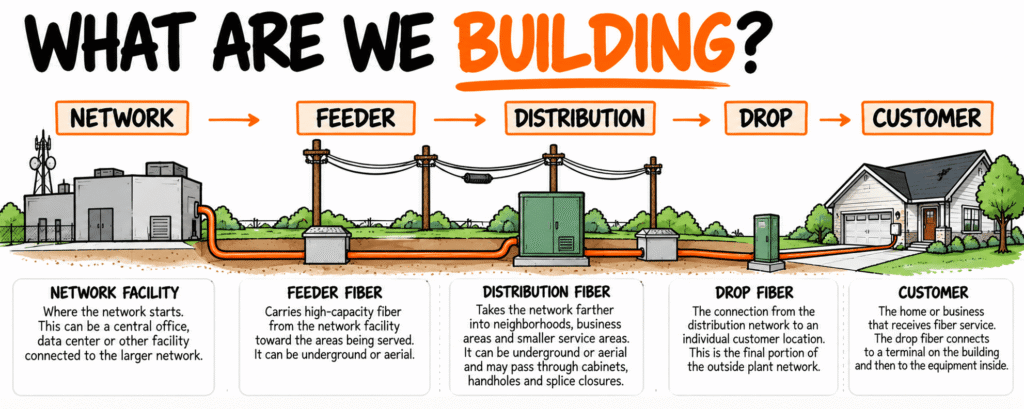
You will commonly hear terms such as feeder fiber, distribution fiber, and drop fiber.
The exact architecture and terminology can vary between network owners, but for now, a beginner can think about the progression like this:
Feeder → Distribution → Drop → Customer
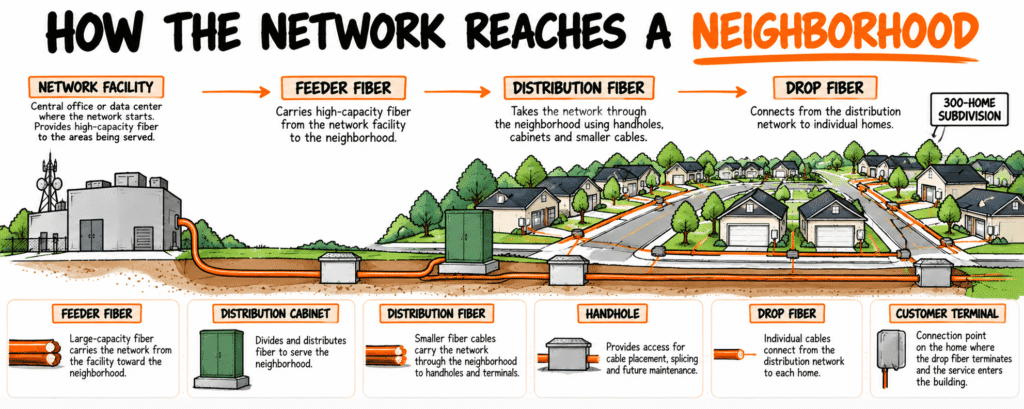
Feeder fiber carries the network from an upstream location toward the general area that needs to be served.
Distribution fiber carries the network through that service area and closer to groups of customers.
A drop is the portion that extends toward an individual customer location.
Go back to our 300-home subdivision.
We do not necessarily run a completely separate cable all the way from the original network location to each of the 300 houses.
Instead, the network is organized so it can serve more specific areas and customers as it moves through the subdivision.
Depending on the network design, you may see equipment and components such as cabinets, hubs, splitters, terminals, and splice closures helping make those connections possible.
You don’t need to understand all of those components yet.
For now, follow the basic path:
Feeder → Distribution → Drop → Customer
As you learn each new component, ask where it fits along that path and what job it performs for the network.
Why Does Fiber Need to Be Spliced?
Our route is not necessarily one continuous fiber cable going everywhere the network needs to go.
Different cables may need to connect.
Routes may branch in different directions.
One cable may end and another may continue.
Individual fibers may need to be connected according to the network design.
That creates the need for fiber splicing.
A fiber splice is a connection between two optical fibers.
One common method is fusion splicing. During fusion splicing, the ends of two glass fibers are prepared, precisely aligned, and fused together to create a continuous optical connection.
Remember, information is traveling through these fibers using light. The connection needs to allow that light to continue from one fiber into the next while keeping the amount of signal loss within the project’s requirements.
The completed splices also need to be organized and protected from the outside environment.
That is one job of a splice closure.
A splice closure is a protective enclosure that can contain splice trays, organized fibers, and the connections between cables.
Think again about a splice closure sitting inside one of the handholes we discussed earlier.
It isn’t there randomly.
A cable enters the location.
Certain fibers are connected.
Other cables may leave the location.
Those connections help determine where the network goes next.
This is why following the network is more useful than simply memorizing what each component is called.
How Do We Know the Fiber Works?
Once the fiber has been placed and spliced, we need a way to verify its optical performance.
We cannot determine everything we need to know by looking at the outside of the cable.
That is where fiber testing comes in.
Different tests can be used for different purposes depending on the project requirements.
One instrument you will hear about frequently is an OTDR, which stands for Optical Time Domain Reflectometer.
An OTDR sends light into the fiber and analyzes the light that returns. That information can help a technician evaluate the fiber and identify certain events or conditions along the optical path.
Another type of testing may use an optical light source and power meter. In simple terms, light is sent into one end of the fiber and measured at the other end to help determine how much optical power was lost through the link.
That loss is commonly referred to as attenuation or insertion loss, depending on what is being measured and how the test is being performed.
You do not need to understand OTDR traces, decibels, reflectance, or testing limits yet.
The important concept right now is much simpler:
A fiber cable can look perfectly fine from the outside and still have an optical problem.
Testing gives us information that visual inspection alone cannot provide.
How Do We Know the Construction Was Built Correctly?
Passing the fiber tests answers an important question:
Does the installed fiber meet the required optical testing criteria?
It does not answer every question about the construction.
Imagine our subdivision network passes its required fiber testing.
But the conduit was installed somewhere different from the approved route and nobody documented the change.
Or handholes were left below the required finished grade.
Or the tracer wire that is supposed to help locate the underground pathway later has no continuity.
Or required construction photos were never taken before the work was buried.
Or yards, sidewalks, and pavement still haven’t been properly restored.
The fiber might work.
The construction can still have deficiencies.
A deficiency is a condition where the work does not meet an applicable project requirement.
This is where inspection and verification become important.
Inspectors compare the work being performed against the requirements that apply to the project.
Those requirements may come from:
- Construction drawings
- Project specifications
- Permits
- Owner requirements
- Manufacturer instructions
- Applicable codes and standards
- Other project-specific requirements
Inspection isn’t simply walking around deciding whether something looks good or bad.
The better question is:
What was required, and what evidence do we have that it was actually done?
That distinction becomes increasingly important as you learn more about OSP construction quality.
Why Does Documentation Matter?
Now imagine it is five years later.
A road-widening project is about to begin near our subdivision.
Someone needs to know where the fiber conduit was actually installed.
The original drill crew is long gone.
The superintendent works somewhere else.
The inspector doesn’t remember exactly what happened.
The original construction drawings show where the conduit was supposed to go.
Someone now needs to know where it actually went.
That is why OSP documentation matters.
Construction records can preserve information that may be difficult or impossible to recreate after the work is complete.
Depending on the project, those records may include:
- Photos showing construction conditions before they were covered or became inaccessible.
- Bore logs recording required information about directional bores.
- Redlines showing field changes from the original construction drawings.
- As-builts documenting the network as it was actually constructed.
- GPS information recording locations of installed infrastructure.
- Test records preserving the required fiber testing results.
- Splice records documenting how fibers were connected.
- Daily reports recording activities and other required information from the workday.
- Deficiency records documenting problems, corrections, and closeout when required.
Different projects require different records.
The important concept is what those records accomplish.
Documentation takes information that people know during construction and preserves it for people who may need it later.
Once something is buried, covered, restored, or everyone involved has moved on to another project, getting that information back can be extremely difficult.
What About Restoration?
OSP construction takes place in places people are already using.
To build the network, crews may disturb lawns, roads, sidewalks, driveways, gravel areas, shoulders, landscaping, and other surfaces.
Those areas need to be restored according to the applicable project requirements.
Restoration is the work required to address the areas affected by construction and return them to the required condition.
Depending on what was disturbed, that could involve:
- Backfilling excavations
- Compacting material
- Replacing topsoil
- Installing sod or seed
- Repairing asphalt
- Replacing concrete
- Restoring gravel
- Repairing landscaping
- Correcting settlement or other construction impacts
This matters because a working fiber network does not automatically mean the construction project is finished.
Imagine the fiber serving our subdivision is completely operational.
Customers have service.
But yards are damaged, trenches have settled, sidewalks are broken, and pavement repairs are unfinished.
The network may be working.
The construction project still has work left to complete.
When Is an OSP Fiber Construction Project Actually Done?
This sounds like a simple question until you ask different people working on the project.
The underground contractor may say their work is done because the conduit is installed.
The fiber placement crew may be finished because the cable has been placed.
The splicer may be finished because the required splices are complete.
Testing may show that the fiber meets the required optical criteria.
But the overall project could still have:
- Open deficiencies
- Missing documentation
- Incomplete restoration
- Unfinished redlines or as-builts
- Unresolved punch-list items
- Other outstanding project requirements
That is why four words that sound similar can describe different things:
Installed means the infrastructure or component has been physically put in place.
Working means it is performing its intended function at that time.
Complete means the required work associated with the scope has been finished.
Accepted means the appropriate party has determined that the applicable requirements for acceptance have been satisfied.
The exact definitions and acceptance process can vary by project and network owner, which is why projects should define what these terms mean rather than assume everyone understands them the same way.
For our beginner, the important lesson is this:
Putting fiber in the ground is only one part of building an OSP network.
The project starts before construction and continues after the physical installation.
That gives us a simple way to organize everything we’ve covered.
A Simple Way to Understand the OSP Construction Lifecycle
There are hundreds of individual activities involved in building a fiber network.
Trying to memorize all of them at once makes OSP harder to understand than it needs to be.
Instead, I use a simpler mental model:
PLAN → PREPARE → BUILD → PLACE → SPLICE → TEST → DOCUMENT → ACCEPT
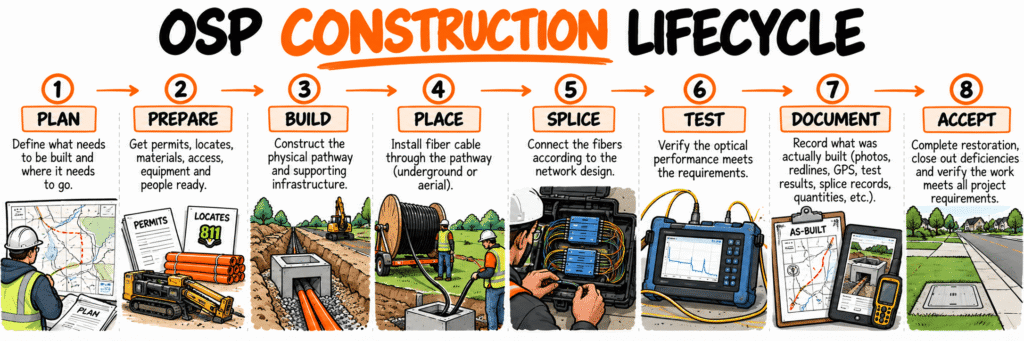
Plan what network needs to be built, where it needs to go, and what requirements will control the work.
Prepare what is needed before construction begins. That can include permits, utility locates, materials, access, equipment, people, construction information, and confirming field conditions.
Build the physical pathway and supporting infrastructure. Depending on the project, that could include conduit, handholes, vaults, poles, strand, and other infrastructure.
Place the fiber cable through the underground pathway or along the aerial route.
Splice the individual fibers together according to the network design.
Test the installed fiber to verify the required optical performance.
Document what actually happened in the field and what was actually built.
Accept the completed work once the applicable project requirements have been satisfied and the required verification is available.
Real construction projects do not always move through those steps perfectly from left to right.
Some activities happen at the same time. Different sections of the project may be at different stages. Designs change. Problems are discovered. Deficiencies require corrections. Testing may identify something that needs to be investigated.
That is okay.
The purpose of this framework isn’t to pretend every project follows a perfect sequence. It gives a beginner somewhere to put everything they encounter.
If someone tells you a crew is mandrel testing conduit, you can connect that activity to verifying the pathway before fiber placement.
If someone asks for OTDR results, you know those records are connected to testing the fiber.
If an inspector is collecting GPS coordinates or marking changes on the construction drawings, you can connect that work to documenting what was actually built.
Instead of memorizing hundreds of unrelated activities, start asking:
Where does this fit in the construction lifecycle?
Who Works on an OSP Fiber Project?
Building an OSP fiber network requires people with different responsibilities. The exact job titles and division of responsibilities vary between companies and projects, and one person may perform several roles.
Some of the people you may encounter include:
- Owner or ISP: The organization having the network built for a business or operational purpose.
- Engineers and designers: Develop the network design, construction plans, and physical route.
- Project managers and construction managers: Coordinate scope, schedule, contractors, communication, materials, risks, and other parts of project execution.
- Utility locators: Help identify existing underground facilities before excavation or drilling.
- Underground construction crews: Build underground portions of the network pathway using the required construction methods.
- Aerial crews: Perform construction and fiber installation associated with pole routes.
- Fiber placement crews: Install fiber cable through underground pathways or along aerial routes.
- Splicers: Prepare and connect individual optical fibers according to the network design.
- Testing technicians: Perform the required optical testing.
- Inspectors: Observe and verify construction against the applicable project requirements.
You don’t need to memorize every job title.
What matters right now is understanding that these people are not performing unrelated jobs.
The underground crew may build the pathway the fiber placement crew needs.
The placement crew installs the cable the splicer will work on.
The splicer’s work affects the optical path that will eventually be tested.
Changes made during construction need to make their way into the project documentation.
Inspectors may be verifying requirements throughout different parts of that process.
Everybody is touching a different part of the same network.
What Does Good OSP Fiber Construction Look Like?
As you spend time around fiber construction, you will hear words such as good, complete, acceptable, ready, passed, and done.
Those words can create problems when nobody has defined what they mean.
If one person says a handhole looks good and another says it doesn’t, personal opinions do not give the project a consistent way to make a decision.
That is why construction quality needs to connect back to defined requirements.
Depending on the project, those requirements may come from construction drawings, specifications, permits, owner standards, manufacturer requirements, applicable codes and standards, and other governing documents.
The exact requirements will change from project to project.
But the basic idea is straightforward:
- The pathway needs to perform the job it was designed to perform.
- Fiber needs to be installed within the applicable requirements.
- Underground facilities need to be locatable when required.
- Structures need to provide the access and protection they were intended to provide.
- Splices need to meet the applicable requirements.
- Testing needs to verify the required optical characteristics.
- Restoration needs to meet the project’s requirements.
- Documentation needs to accurately represent what was built.
That is a much stronger definition of good than:
“Looks good to me.”
A customer having service today is important, but OSP infrastructure may remain in place for decades.
Someone may need to locate it later.
Someone may need to repair it.
Someone may need to add to it.
Someone may need to understand why it was built where it was.
Good construction needs to support the network beyond the day the crew leaves.
OSP Terms Every Beginner Should Know
You do not need to memorize an entire telecommunications glossary before you can understand OSP.
Start with the terms that help you follow the physical network:
OSP, or Outside Plant: Physical telecommunications infrastructure outside buildings and facilities that helps carry the network across the area it serves.
Fiber-optic cable: Cable containing optical fibers that carry information using light.
Conduit: A pathway through which cable can be installed.
Handhole: An underground access structure used to reach conduit, cable, or related infrastructure.
HDD: Horizontal Directional Drilling, a construction method used to create an underground bore path between locations.
Feeder fiber: A portion of the fiber network carrying capacity from an upstream location toward a service or distribution area.
Distribution fiber: Fiber that carries the network farther through the area being served.
Drop: The portion of the network extending toward an individual customer location.
Splice: A connection between optical fibers.
Splice closure: An enclosure used to protect and organize fiber splices.
OTDR: Optical Time Domain Reflectometer, an instrument used to evaluate characteristics of an optical fiber.
Redline: A field record showing changes or installed conditions compared with the original construction drawing.
As-built: Documentation representing how infrastructure was actually constructed.
Restoration: Work performed to return areas affected by construction to the required condition.
Acceptance: The process of determining that completed work satisfies the applicable project requirements.
Don’t worry if you can’t remember all of those yet.
As you start seeing these things in the field and understanding what job each one performs, the terminology starts becoming much easier to remember.
Frequently Asked Questions About OSP Fiber Construction
What does OSP stand for?
OSP stands for Outside Plant. In telecommunications, the term generally refers to physical network infrastructure located outside buildings and facilities.
What is OSP fiber?
OSP fiber refers to fiber-optic cable and associated infrastructure used in an outside plant environment. That can include underground and aerial fiber, conduit, handholes, vaults, poles, splice closures, cabinets, terminals, locating systems, and other components.
What is OSP construction?
OSP construction is the physical work involved in building outside telecommunications infrastructure. Depending on the project, that can include utility locating, directional drilling, trenching, plowing, conduit and handhole installation, aerial construction, fiber placement, splicing, testing, restoration, inspection, documentation, and closeout.
Is OSP fiber underground?
Not always. OSP fiber can be installed underground or aerially. A single network route may use both methods.
What is the difference between OSP and ISP?
OSP means Outside Plant.
ISP commonly means Internet Service Provider.
OSP describes physical telecommunications infrastructure. An ISP is an organization that provides internet service.
What is the difference between OSP and inside plant?
Outside plant generally refers to telecommunications infrastructure located outside buildings and facilities.
Inside plant generally refers to telecommunications infrastructure and equipment located inside buildings or facilities.
The exact boundaries and terminology can vary depending on the network and organization.
Is fiber splicing part of OSP?
Yes, when we’re talking about splicing outside plant fiber. Splicing connects individual optical fibers according to the network design and allows different cables and portions of the OSP network to connect.
What jobs are part of OSP fiber construction?
OSP projects can involve engineering, project management, construction management, utility locating, underground construction, aerial construction, fiber placement, splicing, testing, inspection, documentation, restoration, maintenance, and other specialties.
The exact roles depend on the project and how the organization divides responsibilities.
The Four Questions I Would Start With
If you are brand new to OSP fiber construction, you are going to encounter hundreds of unfamiliar objects, processes, documents, acronyms, and construction methods.
Trying to memorize everything at once isn’t the goal.
When you encounter something new, start with four questions:
1. What is it?
First, identify what you are looking at.
Is it a piece of infrastructure? A tool? A construction method? A document? A piece of network equipment?
Get the name first.
2. What does it do?
Knowing the name isn’t enough.
Figure out why it exists and what job it performs.
If it disappeared from the network, what problem would that create?
3. What is it connected to?
Now stop looking at the object by itself.
What comes into it?
What leaves it?
What happened before this point in the network?
4. Where does the network go next?
Follow the network.
If fiber enters this location, where does it go when it leaves?
Does the route continue?
Does it branch?
Does it transition from one type of infrastructure to another?
Is it getting closer to the customer?
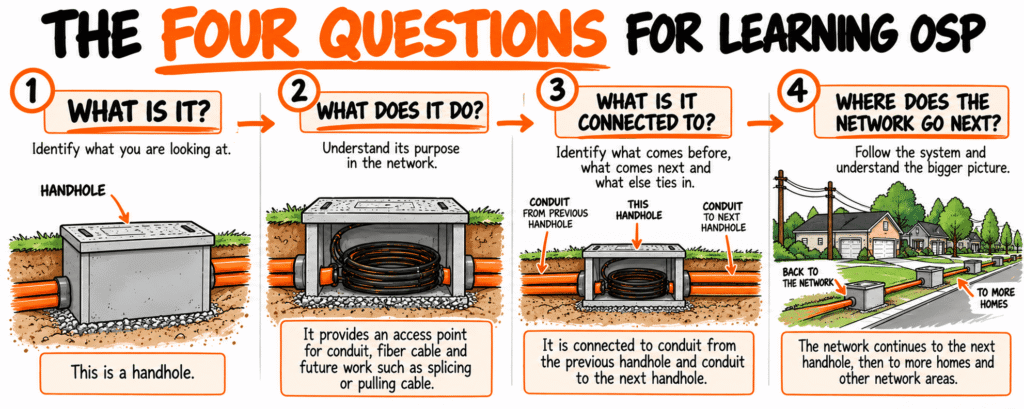
If you find a handhole, don’t stop once you know it is called a handhole.
Start looking at what is around it.
There may be conduit entering one side and leaving another. Fiber may be traveling through that conduit. There may be cable slack stored inside the handhole or a splice closure connecting fibers before the network continues.
Now start asking questions.
Where did this conduit come from?
Follow the route backward. What part of the network is feeding this location?
Where is it going?
Follow the route forward. Is it continuing toward another handhole, a cabinet, another section of the neighborhood, or somewhere else?
What is inside it?
The conduit is only the pathway. What cable or other infrastructure is using that pathway?
Why was the handhole placed here?
Maybe crews needed an access point. Maybe the route changes direction. Maybe fiber needs to be stored or spliced here. Maybe another conduit branches away from this location.
Then zoom back out.
Does the network continue straight through?
Does it change direction?
Does it branch?
What happens next?
You are no longer looking at a plastic or concrete box buried in the ground.
You are starting to understand the job that box performs within the network.
That is the goal.
When you encounter something new in OSP, learn its name. Then learn its purpose. Figure out what connects to it. Then follow the network to whatever comes next.
Do that enough times and the things you see along the side of the road stop looking like a bunch of unrelated pieces.
They start looking like a network.
Related reading: The Parts of a Fiber Network (Part 1), Feeder vs Distribution, The Parts of a Fiber Network (Part 2)